LinkedIn Connection Limits in 2026: What Changed, and What It Means If You Work With Reps
If you built your LinkedIn outreach plan on a number you learned a year ago, it is wrong now, and probably wrong by more than you think.
Across 2024, 2025 and 2026 the invitation ceilings came down at every level. Not one adjustment: three, compounding. The reduction wasn’t even either. The month tightened roughly twice as hard as the day and the week, which quietly broke the way most teams plan volume.
We have tracked this across the reps we work with since January 2026. Here is what we see, what it means if you work with reps, and the protocol we use when one starts to struggle.
Worth saying up front, because it is usually stated the other way round: none of these numbers were ever published rules. LinkedIn has always set invitation limits algorithmically, per profile. The figures people quoted, anywhere from 30 to 50 a day in 2025, were consensus guesses. What changed is that the algorithms got less generous, and pickier about what earns room.
Three cuts in three years
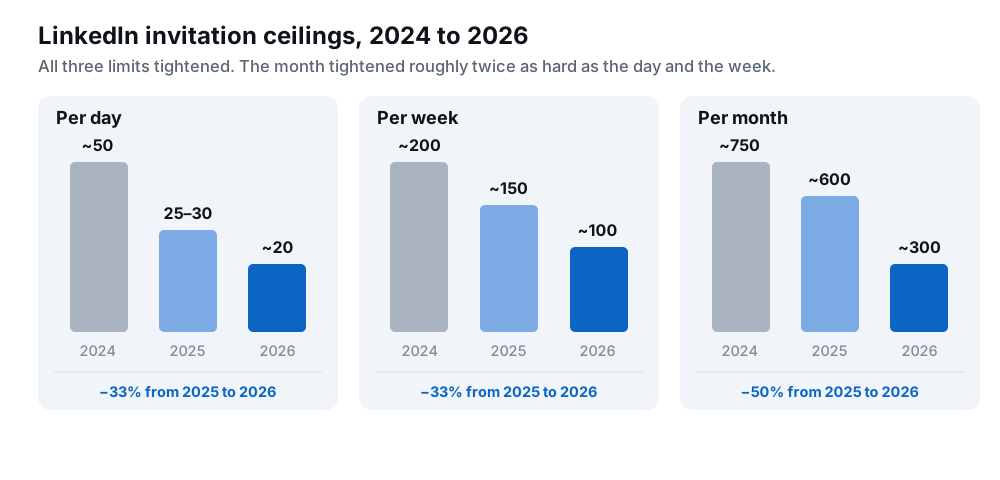
In 2024 a profile could work through roughly 50 invitations a day, 200 a week and 750 a month. By 2025 that was 25–30 a day, 150 a week, 600 a month. In 2026 it is about 20 a day, 100 a week and 300 a month, with a well-run profile reaching 300–400.
The day and the week each came down by about a third between 2025 and 2026. The month came down by half. That gap is where most volume plans now break.
The scale of the drop is the first thing to absorb. A profile that comfortably worked through 600 invitations a month in 2025 has roughly half that room now, so a pipeline model built on last year’s throughput will over-forecast badly. No amount of campaign tuning recovers the difference, because the constraint isn’t the campaign.
A daily ceiling is not a monthly forecast
Weekly and monthly figures are not separate limits to manage. They are the daily number added up. The only lever you set is the daily pace, and the month simply shows what that pace is really amounting to.
Through 2025 the arithmetic was comfortable. Twenty-five to thirty a day across twenty business days is 500 to 600, and that is roughly what profiles delivered. In 2026, twenty a day across the same twenty days is 400, and most profiles land nearer 300.
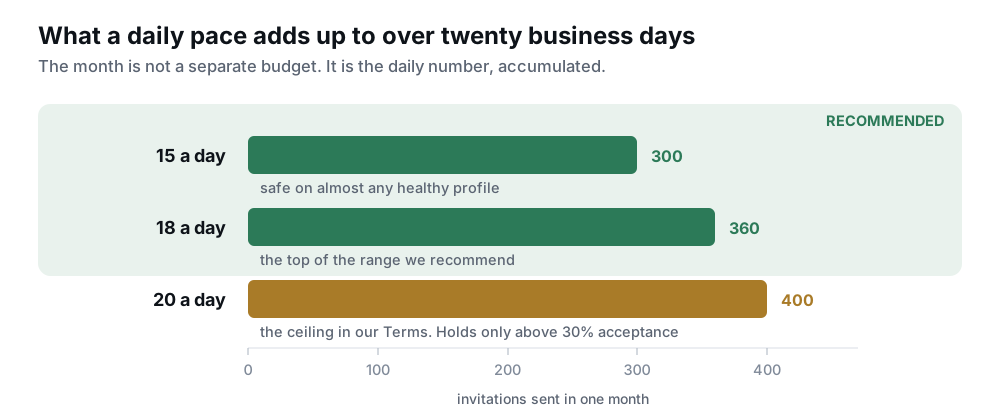
That shortfall is not a monthly cap you can plan around. It is acceptance rate showing up at scale: healthy acceptance delivers close to what the pace implies, and a profile drifting under 20% gets trimmed.
So the planning stays daily. Set a pace the profile can hold, then protect acceptance. Fifteen to eighteen invitations a day is the range we recommend. Twenty is the ceiling, and it only holds on a profile running acceptance comfortably above 30%.
Set 15–18 a day and keep acceptance above 30%. Use the monthly total to check whether that pace is actually landing, not as a budget to spend down.
What the algorithms actually read
Volume is the part that gets watched most, and it matters less than you would expect. What the algorithms weigh is whether the profile behaves like a person with a professional life. That comes down to two things.
- Acceptance rate. The clearest signal we have of how a profile is being received, and across those reps it tracks the allowance more tightly than anything else we measure. Invitations that get accepted buy room. Invitations that sit ignored cost it.
- Everything the profile does besides sending invitations. Posting, reposting, commenting, liking, holding actual conversations, connecting with former colleagues, university alumni and members of groups it belongs to, engaging with its own existing network. This is the part that gets overlooked, and it separates profiles that hold their allowance from profiles that don’t.
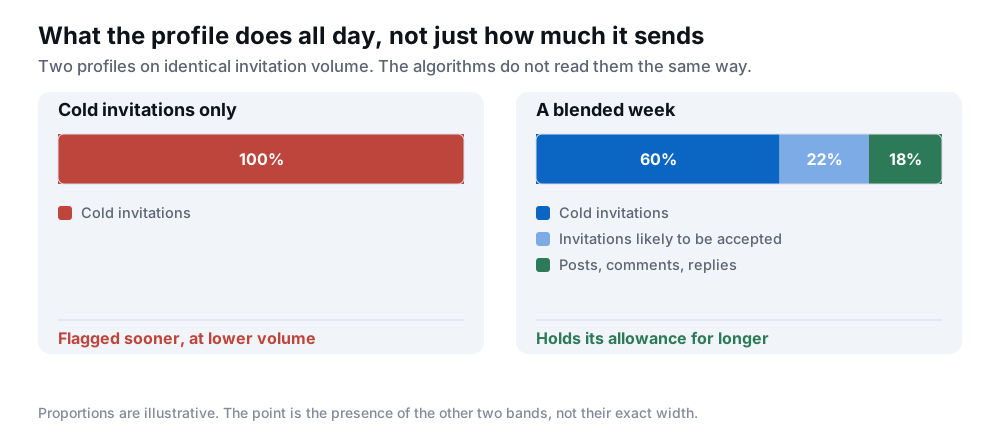
A profile that does nothing but send cold invitations gets flagged sooner, and at lower volume, than one sending the same invitations alongside ordinary professional activity. It’s the first thing we check when a client’s reps underperform against the rest. None of that is a trick, which is the point of it: a real person with a real job posts occasionally, replies, congratulates a former colleague. A profile that only ever cold-invites reads as a single-purpose account, and the scoring treats it as one.
Two kinds of trouble: soft freeze and frozen
So what happens when the algorithms decide against a profile? It shows up in one of two states. They look nearly identical on a weekly send total and need completely different responses, so we name them separately.
| State | What you see | Comes back on reset? | What it means | What to do |
|---|---|---|---|---|
| Safe | No alert. Sending at your policy pace. | n/a | The allowance is intact. | Hold the pace. Keep acceptance clear of 20%. |
| Soft freeze | A limit alert has fired, but the profile still clears at least 20 invitations a week. | Yes, normal pace resumes. | A warning, not a wall. Almost always recoverable. | Stop the cold campaign, fix acceptance, resume in one to two weeks. |
| Frozen | Can’t get past roughly 20 a week at all. No error, no notification. | No. | The allowance has collapsed. A countdown has started. | Same protocol, urgently, and plan for a replacement. |
The diagnostic is one question: does the profile come back when the sending window resets? If yes, you have time. If no, you have about four weeks.
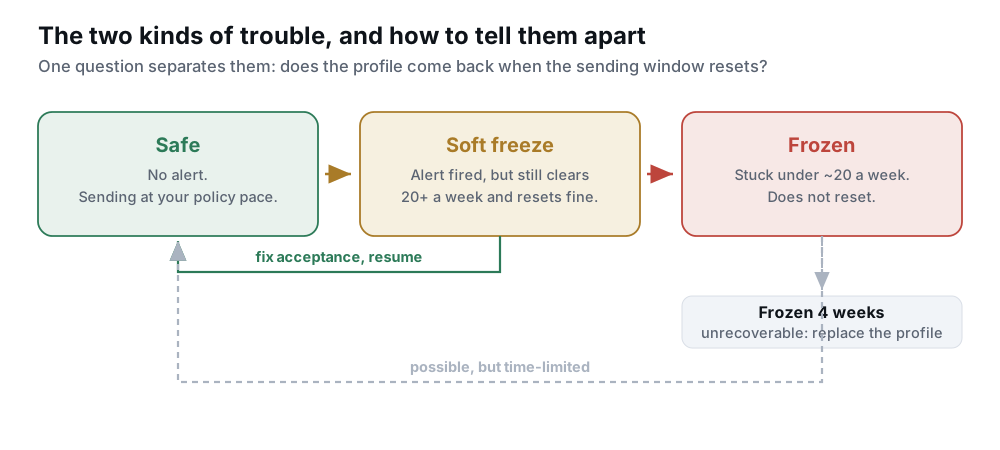
The four-week rule. Once a profile has been frozen for four weeks we treat it as unrecoverable. Nothing we have tried reliably brings one back, and continuing to send only adds to the signal that froze it.
Which is the argument for catching it early: the recovery protocol below works far better in week one than in week four. Both states usually share one root cause, and it is the number the next section is about.
Acceptance rate is the lever. 20% is the line.
This is the number we look at before send volume. Acceptance rate is an input to your allowance; volume is an output of it. Optimising the output is the easier instinct, and it is why campaigns that look productive in week one are in trouble by week three.
Below 20% acceptance, a profile is heading for a limit alert. That’s where we step in, and it’s an earlier warning than the alert itself. By the time the alert fires, the rate has usually been unhealthy for a fortnight.
The awkward part is that the obvious fix is slow. Better targeting and better copy are the right answers, and they take weeks to move the ratio. A profile sliding toward trouble doesn’t have weeks.
The friendly-invite split
So here’s what we tell clients to do, and it recovers more profiles for us than anything else: split the invitation budget between cold prospecting and invitations that are almost certain to be accepted.
Not padding, and not strangers. People the rep has a real reason to connect with:
- Colleagues, and the client’s own team.
- People the rep or the client already knows: former contacts, existing customers, partners.
- Alumni of the same university, and members of groups the profile genuinely belongs to.
- Active people in the rep’s own communities. Those who post and comment accept far more readily than dormant accounts do.
Acceptance rate is a ratio, and you decide what goes into it. Blending in invitations that land at a high rate pulls it back over the line and buys the weeks that targeting and copy need. Run alongside the engagement activity above, it repairs both signals at once.
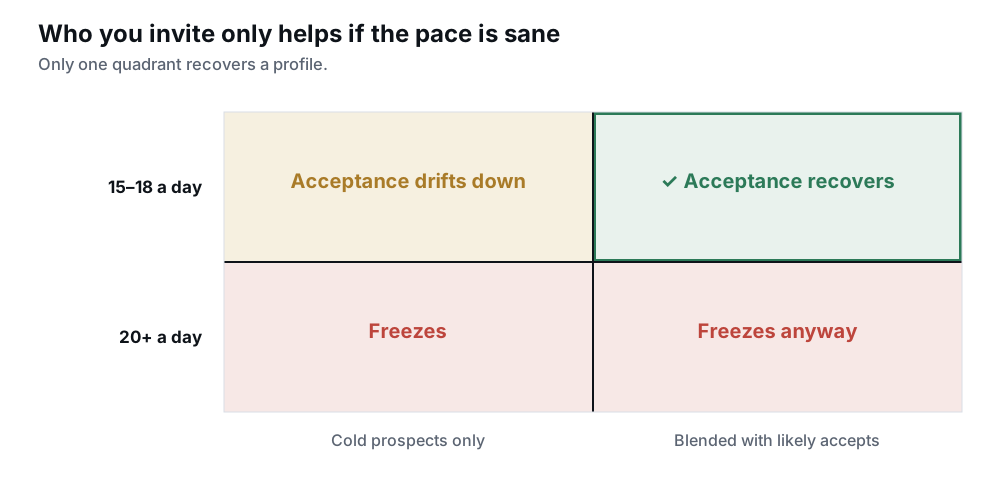
Two limits on it:
- It is not permission to send more. Past roughly 20 a day the pace itself is the problem, and a friendly audience will not rescue it.
- It is not a reason to jump the volume. A sudden increase reads as a spike whoever it is aimed at, so the friendly half climbs the same ladder as everything else, by about 2 a day.
Applied at the first alert, this usually returns a profile to normal pace. Applied late, it’s often what keeps a soft freeze from hardening into a freeze, which matters given the four-week rule.
One honest caveat. This only works if the connections are real. Mass-inviting anyone who’ll accept lifts the ratio and degrades the relevance of the network at the same time, and network shape feeds the same allowance. Keep the friendly half to connections the rep would plausibly have made anyway.
Limit, checkpoint, restriction: three different problems
Soft freeze and frozen are the only two states a limit problem comes in. Two other things get called by the same names, and because they need different responses they are worth separating:
- A limit problem is the allowance tightening. No notice, nothing to appeal, and the only route back is through the sending itself.
- A checkpoint is a hurdle before access resumes, usually a forced password reset or a quick identity check. Routine, and much smaller than a restriction. A clean send history exempts nobody from one.
- A restriction is the account itself being held or suspended. That one arrives with a notice and an appeal route, and it is a different problem with a different fix.
Checkpoints have become far more common this year too, and across those reps they arrive for reasons that have little to do with how many invitations went out:
- A new device or location on the session.
- A workspace that looks freshly built.
- A sharp change in pace.
- Nothing identifiable at all. LinkedIn has always run random checks, and a share of what we see is exactly that.
A profile with a real person behind it clears one, because someone can answer for it. A fabricated persona has nothing to present, and that is usually where the account ends.
A freeze is answered by changing how the profile sends. A checkpoint is answered by proving who the profile is, which a rep with a real person behind them can do.
What working with reps changes, and what it doesn’t
Start with the part that cuts against us. LinkedIn does not treat a rep’s profile differently from one you own. No flag, no penalty and no free pass, and we would see it across our own reps if there were. What reps change is how many profiles you can send from and who carries the risk, not how hard you can push one.
What does differ is the starting condition. Age, network size and shape, standing and engagement history all feed the allowance, and none of them can be manufactured quickly. That is the case for working with an established, real profile rather than building one from scratch: a year-old rep with 500+ genuine connections starts with more room than a three-month-old persona, and it has a real network to draw the friendly half from.
That condition is ours to supply and the campaign is yours. We match you with the rep and handle the safety monitoring; you choose the targets, write the messages and set the cadence. The algorithms score the combination and hand down one number.
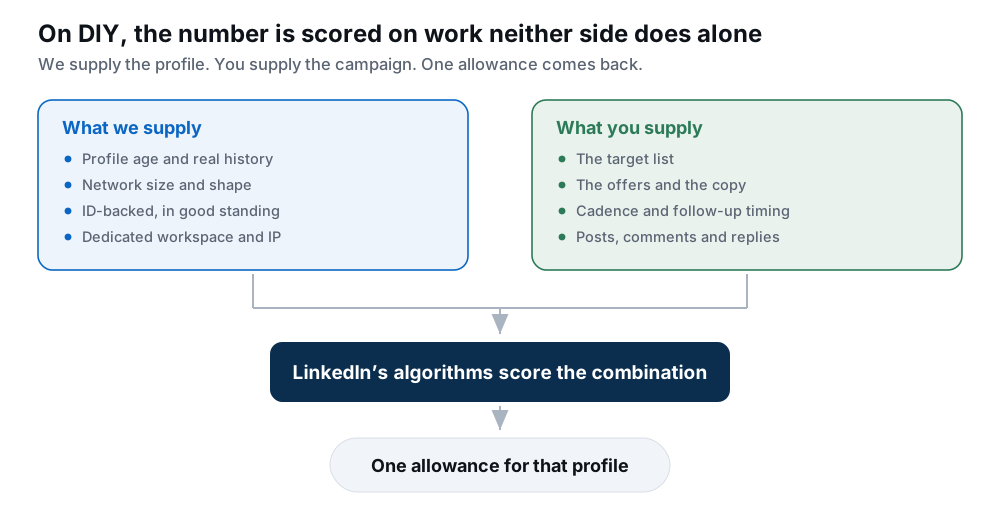
So a well-sourced rep with a poorly targeted campaign slides under 20% acceptance and loses its allowance, and a careful campaign on a thin, new profile never gets much room to begin with. When the number drops, finding out which side it came from in week one costs far less than in week four.
What we tell clients to send
Our usage policy moved with the platform. The current numbers, from the Terms:
| Activity | What we ask for | Why it sits there |
|---|---|---|
| Connection requests | Start at 5/day, increase by 2 daily, 20/day maximum | The ramp is the warm-up ladder. 20 is where you top out, not where you live. |
| Profile visits | 25–30 per day | Browsing that outruns your invitation volume is a pattern, not activity. |
| Company page visits | Up to 50 per day | Same reasoning, looser bound. |
| Searches | Up to 15 per day | Search velocity is one of the cheapest automation tells to trip. |
| Messages | ~400 characters, follow-ups at least 3 working days apart | Cadence is an engagement signal. Fast follow-ups raise block rate, which feeds the allowance. |
The ramp came down with everything else. It used to open at 15 a day and climb to 25. Starting at 5 costs about a week of volume at the front and buys a clean read on acceptance before the profile carries weight.
That ceiling is a maximum rather than a target. Fifteen to eighteen a day is the pace we recommend. A rep steady in that range with acceptance above 30% is in better shape than one pushing 20 at 15% acceptance, and the second is roughly a fortnight from a soft freeze.
Finding the ceiling costs more on a rep’s profile than on your own account. Hitting it repeatedly raises the chance LinkedIn asks the profile to verify itself again, and on a rep’s profile that check goes to the rep, not to you. That becomes a support ticket and a pause rather than something you clear in thirty seconds.
Three columns, and send volume isn’t one
Send volume tells you what you did. It says nothing about what LinkedIn made of it. Three columns per rep, in this order:
- Acceptance rate, against a 20% action line. The leading indicator, and the one you can actually fix.
- Block rate. Blocks and reports take one click under a message that reads as a pitch, and LinkedIn never notifies you. It moves before acceptance does.
- Stops: how many times this rep hit a ceiling. Confirmation that the allowance is tightening, and worth driving to zero rather than settling for low.
Reply rate belongs on the campaign dashboard, not the health one. It’s a lagging indicator: by the time it drops, the cause is a fortnight old.
And keep all three per rep. A blended acceptance rate of 30% across ten reps can hide one rep at 8%, and the blend is what hides the one you’re about to lose.
The multi-rep math holds. The caveat got bigger.
Allowances are per profile, so more reps genuinely means more capacity. That hasn’t changed, and it remains the only real way past one profile’s ceiling, and the eight ways to scale compares the options.
What changed is that every rep’s profile now carries its own allowance, and the cheapest way to lose ten at once is to run one campaign across all ten. Ten reps sending the same pitch to the same ICP is one pattern repeated ten times, and they cross the 20% line in the same week. The most common problem we see isn’t volume. It’s one message, cloned.
Independence, concretely:
- Each rep on their own profile and their own setup. Nothing shared between reps.
- Three to five genuinely different offers across your reps, not one pitch with shuffled adjectives.
- Staggered timing. Ten reps starting at 9:00 is one behaviour, not ten.
- Their own engagement activity, not just their own send queue.
- A monthly total tracked per rep, so a quiet profile shows up against the others rather than hiding in an average.
- A fresh warm-up ladder for every new rep, even when the campaign is already at full volume.
Working with reps across several clients: how agencies structure this at 10+ clients works through the capacity planning, and what to do when your team’s own accounts are restricted covers the in-house version.
The recovery protocol, in order
Soft freeze or frozen, the sequence is the same. Only the urgency changes, and the order matters more than any individual step.
- Check acceptance rate before you change anything else. If it’s under 20%, that is your cause, and nothing else will hold while the ratio stays there. Rewriting copy first is guesswork until you know the ratio.
- Stop the cold campaign completely, rather than easing off. Retrying into a ceiling is what turns a soft freeze into a freeze.
- Tell us early. We’ll work the recovery with you and plan a replacement if it comes to that. An isolated restriction is a different conversation from one that followed a campaign running past the limits, which is another reason to raise it in week one.
- Put the profile back to work as a person for one to two weeks. Posts, comments, replies, engagement with its existing network. None of this touches the invitation allowance, and it is the activity the algorithms have been missing.
- Rebuild the target list and the copy. Look at who ignored you, not just who replied. Restarting the same campaign more slowly only reaches the same ceiling later.
- Restart at 5 a day and climb again, with the friendly-invite split running until acceptance is comfortably clear of 20%.
If the profile is already frozen, start the replacement conversation in parallel rather than at the end of the month. The four-week clock keeps running while you work through the list.
One thing worth knowing before you scale hard. If freezes and restrictions start hitting a large share of your reps inside the same week, we look at the campaign rather than keep issuing replacements. A pattern showing up across reps is almost always one campaign problem repeated, usually that cloned message, and feeding fresh profiles into it just burns real people’s accounts.
Working through a restriction now: why profiles get restricted and how to fix it, and the recovery guide.
Five things that don’t move the number
Working across many reps gives us a clear view of the levers people reach for first. These five come up often, and none of them changes the number:
- Spending more on infrastructure. We look after the secured infrastructure behind every rep, so we see this directly. A stable, consistent setup matters enormously. A more expensive one buys no headroom.
- Sending manually. The allowance sits on the profile, not on the method. Doing it by hand doesn’t route around it.
- Which outreach tool you use. Tools differ on how well they mimic human timing and how quickly they get profiles restricted, which is a real difference, but none of them raises the ceiling.
- Buying Sales Navigator. This one has been repeated for years, but it has never been true. Sales Navigator raises search limits. It has never raised connection limits.
- Getting the verification badge. A badge and a real person behind the profile are different things, and it’s the second that matters when LinkedIn asks a profile to prove itself. We have not seen a badge change an allowance.
What does move it is less interesting than any of those: whether people accept your invitations, and whether the profile does anything else with its day.
The short version
The ceilings fell at every level between 2024 and 2026, and the month fell hardest. That last part is what breaks plans: the same daily discipline that worked in 2025 now delivers noticeably less.
Three things follow:
- Set a daily pace of 15 to 18 and leave the ceiling alone.
- Watch acceptance rate. Aim above 30% and act at 20%, because it moves a fortnight before any alert does.
- Give each profile something to do besides cold invitations. A profile with only one function is the easiest kind to spot.
If you work with reps, it splits cleanly. The starting condition is ours to get right: age, network, history, standing, and a real person behind the rep. The ongoing signals are yours: targeting, offer variety, cadence, acceptance, engagement. Neither half carries the other.
Frequently asked questions
What changed about LinkedIn connection limits in 2026?
The ceilings came down at every level, and unevenly. Per day went from 25–30 in 2025 to about 20; per week from ~150 to ~100; per month from ~600 to about 300, with a well-run profile reaching 300–400. Day and week each fell about a third while the month fell by half, so the daily ceiling and the monthly allowance no longer line up.
Was the LinkedIn connection limit ever a fixed number?
No. LinkedIn has always applied invitation limits algorithmically and dynamically, per profile. The figures people quoted, 30 a day or 50 a day, were consensus guesses rather than published rules. What changed in 2026 is that they became considerably tighter and more sensitive to how a profile behaves.
How many connection requests should a LinkedIn rep send in 2026?
Start at 5 a day and increase by 2 daily, up to 20. In practice most reps should settle at 15 to 18 a day rather than living at the ceiling, which adds up to roughly 300–360 a month. Let acceptance rate decide where in that range you sit.
What acceptance rate do I need on LinkedIn in 2026?
Aim above 30%, and treat 20% as the line where you act rather than as a target. Below 20% we intervene, because that profile is on its way to a limit alert. Comfortably above 30% and you have room to run at the top of the 15–18 range. The rate is now the strongest single input into the allowance a profile is given.
How do I fix a low LinkedIn acceptance rate quickly?
Split the invitation budget between cold prospecting and invitations almost certain to be accepted: colleagues, existing contacts and customers, alumni of the same university, members of groups the profile belongs to, and active people in its own communities. That lifts the ratio while better targeting and copy have time to work. Keep the friendly half genuine: mass-inviting anyone who’ll accept degrades network relevance, which feeds the same allowance.
Does posting and commenting affect LinkedIn connection limits?
Yes, and it’s underrated. A profile that only sends cold invitations is flagged sooner, and at lower volume, than one sending the same invitations alongside posts, reposts, comments, replies and engagement with its existing network. The algorithms are reading whether the profile behaves like a person, not just whether it stayed under a number.
What’s the difference between a soft freeze and a frozen LinkedIn profile?
A soft freeze means a limit alert has fired but the profile still clears at least 20 invitations a week and returns to normal pace when the window resets. Recoverable, usually within two weeks. Frozen means it can’t get past roughly 20 a week and doesn’t come back on reset. After four weeks frozen we treat it as unrecoverable and plan a fresh rep with you.
Does Sales Navigator raise your connection limit?
No, and it never did. Sales Navigator raises search limits. Profiles on paid plans often send more, but that reflects the targeting quality and consistent activity that tend to come with a serious subscription, not the subscription itself.
Does the LinkedIn verification badge raise your connection limit?
No. The badge is a trust signal for the people looking at the profile, not an input to the invitation ceiling, and we have not seen one change a profile’s allowance. Having a real person behind the profile is the thing worth having, and it is what clears an identity checkpoint.
Is a LinkedIn freeze the same as a restriction?
No. A freeze is the invitation allowance tightening, with no notice and nothing to appeal, and it is fixed by changing how the profile sends. A restriction is the account itself being held or suspended, which arrives with a notice and an appeal route. A checkpoint is a third thing, and a much smaller one: a password reset or an identity check before access resumes.
Why is LinkedIn asking my profile to verify its ID?
Checkpoints have become more common, and they don’t require anything to have gone wrong. A new device or location on the session, a workspace that looks freshly built, a sharp change in pace, or a random check will all do it. It is usually a forced password reset or a quick identity check before access resumes, and a profile with a real person behind it clears it.
Does LinkedIn treat a rep’s profile differently from your own?
No. No penalty and no exemption, and we would see it across our own reps if there were. What differs is the starting condition: an established profile with a real network and genuine history scores better on the signals the allowance is built from. Hiring a rep isn’t the advantage; the profile’s history is.
Do multiple profiles multiply the connection limit?
Yes, allowances are per profile. But each rep has to hold their own condition independently: their own profile and setup, staggered timing, different offers, their own engagement activity, and per-rep acceptance tracking. Ten reps on one duplicated campaign won’t give you ten times the capacity for long.