LinkedIn Limits Explained: Connection, Message, Search & View Caps (2026)
Complete 2026 LinkedIn limits guide: daily connection requests, message limits, profile view restrictions, and how to stay compliant at scale.
LinkedIn enforces activity limits to prevent spam and maintain platform quality. Exceed them, and you risk temporary restrictions that pause your entire pipeline.
This post breaks down current LinkedIn limits (as observed in early 2026) and shows you how to work within them effectively.
Why LinkedIn Limits Exist
LinkedIn sets caps on connections, messages, and profile views to prevent spam, ensure quality networking over mass outreach, and encourage upgrades to paid accounts for commercial use. Understanding these limits helps you avoid account restrictions.
LinkedIn Limits: Complete Comparison Table
Here's a breakdown of LinkedIn activity limits across account types:
| Activity | Free Account | Premium | Sales Navigator |
|---|---|---|---|
| Weekly Connection Requests | ~100 (recommend 80) | ~100* | ~100* |
| Daily Connection Requests | ~20 | ~20* | ~20* |
| Connection Note Limit | 200 characters | 300 characters | 300 characters |
| Personalized Notes/Month | 5-10 | Unlimited** | Unlimited** |
| Weekly Messages | ~100 | ~150 | ~150 |
| Monthly InMail Credits | 0 | 15 (Business) | 50 (Core) |
| Daily Profile Views (Safe) | 100-250 | 500-1,000 | 100-150 (LinkedIn.com) / 600-800 (Sales Nav) |
| Total Connections | 30,000 | 30,000 | 30,000 |
*A paid plan does not raise the connection limit. High SSI scores and 40%+ acceptance rates mean fewer throttles at the same ceiling
**Unlimited notes within weekly connection limit
LinkedIn doesn't officially publish most limits. These represent safe operating ranges based on early-2026 observations, after LinkedIn cut the monthly connection allowance from roughly 600 to about 300–400. In practice a profile working the daily ceiling lands at 300–400 a month depending on performance. Exceeding them triggers warnings or restrictions.
Connection Request Limits Explained
Weekly and Daily Caps
Standard limit: ~100 connection requests per week across all account types, about 300–400 a month, after LinkedIn cut the monthly allowance from roughly 600 to about 300–400 in early 2026. Free accounts should target 80/week for safety. Treat every figure here as a typical ceiling rather than a guaranteed one. LinkedIn has never published these numbers and has always applied them per profile through its algorithms. What changed in 2026 is how much tighter they became. How the per-account model works.
Premium and Sales Navigator users with strong account health (SSI above 65, acceptance rates above 40%, account age 6+ months) hold the full ~100 requests per week with fewer throttles. The ceiling itself is the same as a free account.
Daily distribution:
- Free: 15-20 per day
- Premium/Sales Nav (standard): 20 per day
- Premium/Sales Nav (high SSI): still up to 20 per day, with fewer throttles
Spread requests throughout business hours. Avoid weekend spikes.
Personalized Notes
Free accounts: 5-10 personalized notes per month. After this, you can only send blank requests.
Paid accounts: Unlimited notes within weekly connection limits.
Character limits: 200 (Free) vs 300 (Premium/Sales Nav).
What Happens When You Hit the Limit
LinkedIn displays: "You've reached the weekly invitation limit." This temporarily pauses new connection requests until the following Monday.
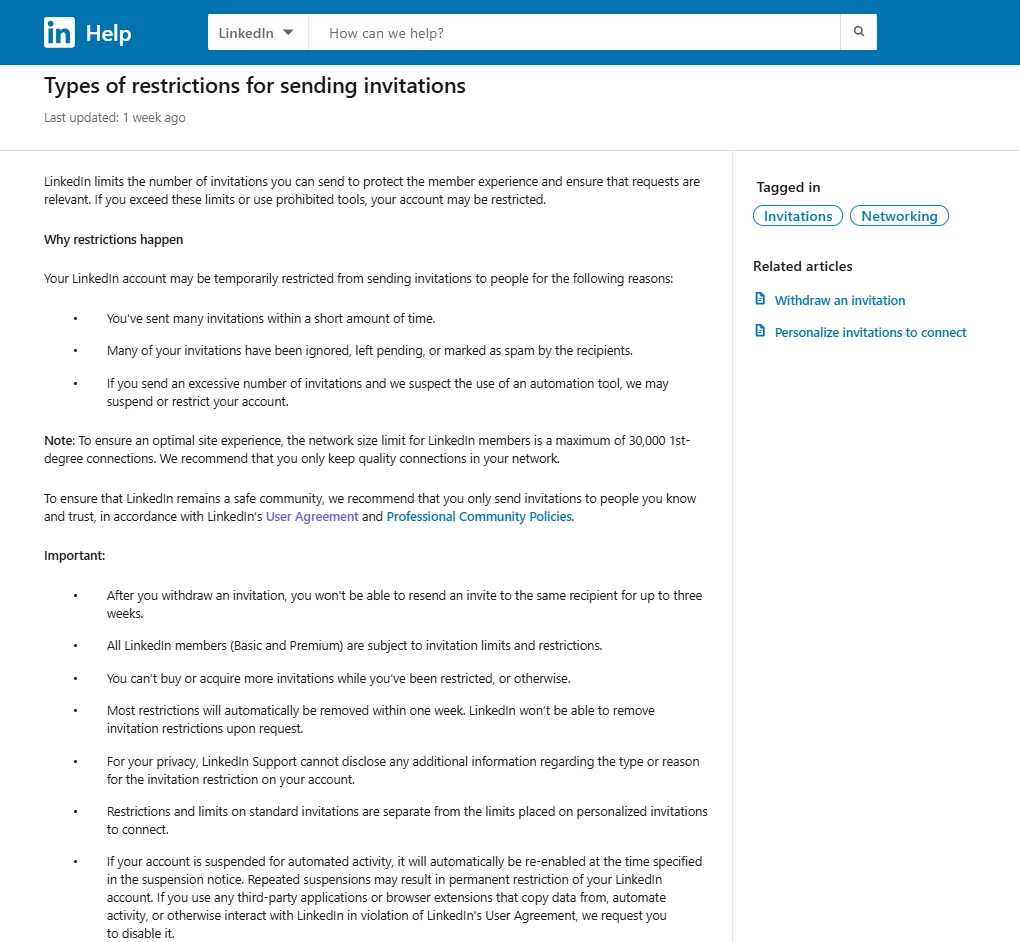
According to LinkedIn's official documentation, restrictions happen for three reasons:
- Volume: Sent many invitations in a short time
- Rejection rate: Many invitations ignored, pending, or marked as spam
- Automation detection: Excessive invitations + suspected automation use
(For more information: LinkedIn - Types of restrictions for sending invitations)
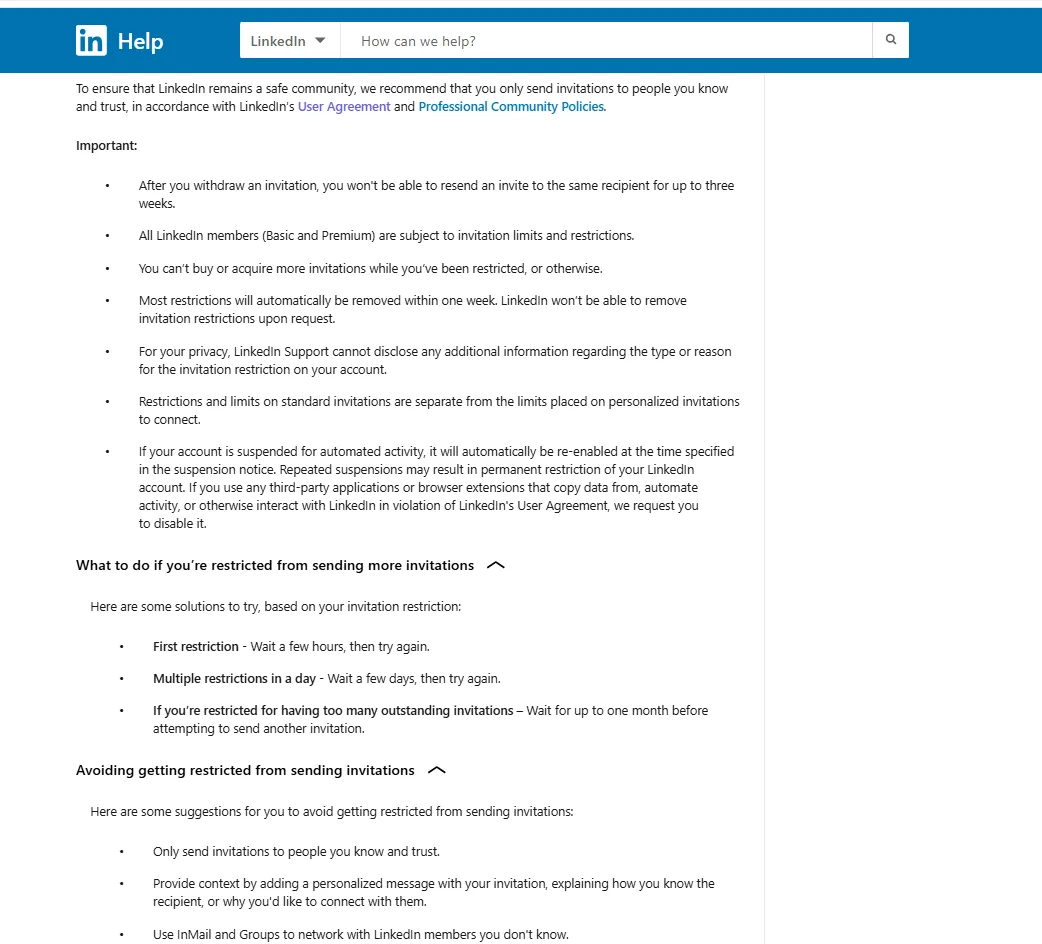
Key points from LinkedIn:
- Most restrictions auto-remove within one week
- All members (Basic and Premium) subject to limits
- Repeated violations result in permanent restriction
- Automation detection triggers immediate suspension
- Can't purchase additional invitations while restricted
Recovery protocol: Reduce volume 40-50% the following week. Focus on acceptance rate quality over quantity.
Message Limits Breakdown
LinkedIn doesn't publish official message limits. Safe operating ranges:
| Account Type | Weekly Messages | Daily Range |
|---|---|---|
| Free | ~100 | 15-20 |
| Premium | ~150 | 20-30 |
| Sales Navigator | ~150 | 20-30 |
InMail Credits
- Free: 0 InMails
- Premium Business: 15/month
- Sales Navigator Core: 50/month
Character Limits
- Regular messages: 8,000 characters
- InMail subject: 200 characters
- InMail body: 1,900 characters
- Connection notes: 200-300 characters
- File attachments: 20MB maximum
Profile View Limits
| Account Type | Safe Daily Range |
|---|---|
| Free | 100-250 views |
| Premium | 500-1,000 views |
| Sales Navigator (LinkedIn.com) | 100-150 views |
| Sales Navigator (Sales Nav interface) | 600-800 views |
Critical distinction: Sales Navigator users viewing profiles on LinkedIn.com face much lower limits than viewing within the Sales Navigator interface.
Exceeding limits triggers "unusual activity" warnings. These limits fluctuate based on account age and SSI score.
Scaling Within Limits
Multi-Profile Distribution
Distribute activity across multiple accounts:
- 5 reps × 100 connections/week = 500 total capacity
- 10 reps × 100 connections/week = 1,000 total capacity
Each profile must keep its own independent, natural activity pattern. This is the model behind hiring LinkedIn reps. A LINKEDSDR rep is a real, US-based professional with an established LinkedIn profile (1+ year, 500+ connections) who makes that profile available to you under contract with LINKEDSDR. You run the outreach from it, through your own outreach tool, inside a secure Rep Workspace we set up. The rep doesn't prospect for you. Each rep's profile adds roughly 300–400 invites a month inside these limits.
| Days | Daily Connections | Notes |
|---|---|---|
| Days 1-3 | 5 → 7 → 9 | Tight targeting, likely accepters first |
| Days 4-6 | 11 → 13 → 15 | Keep engaging daily alongside invites |
| Days 7-9 | 17 → 19 → 20 | Begin follow-ups, 3+ working days apart |
| Day 10+ | 20 maximum | Hold steady; watch acceptance rate |
Start at 10 a day and add 2 daily until 20. Brand-new or thin profiles need a few weeks of profile-building first. The full ramp guide.
Quality Over Volume
- Target acceptance rates above 40%
- Build SSI above 65 for higher limit tolerance
- Personalize outreach with specific details
- Maintain organic engagement (posts, comments)
Timing Best Practices
- Spread activity throughout business hours (9am-6pm)
- Add random delays (30-120 seconds between actions)
- Vary daily volumes slightly
- Minimize weekend activity
Conclusion
LinkedIn's limits (~100 weekly connections, ~100-150 weekly messages, and fluctuating profile view restrictions) require strategic planning for scaled outreach.
For teams managing multiple profiles, individual limits multiply: 5 reps at ~100 connections each deliver ~500 weekly capacity. Success comes from working within limits through proper distribution, gradual warm-up, and quality targeting over mass outreach.
Build acceptance rates above 40%, maintain high SSI scores, and spread activity naturally throughout business hours. The platform rewards professional, targeted networking.
FAQ
What triggers LinkedIn invitation restrictions?
LinkedIn restricts accounts for three reasons: (1) sending many invitations in a short time, (2) high rejection rates (invitations ignored or marked as spam), or (3) suspected automation use. Most first-time restrictions auto-remove within one week. Repeated violations result in permanent restriction.
Are Sales Navigator limits higher than Premium?
Connection and message limits are similar. Sales Navigator's advantage is higher profile view limits within the Sales Navigator interface (600-800 safe daily vs 100-150 on LinkedIn.com) and more InMail credits (50 vs 15 monthly). The real value is advanced search filters and research capacity.
How can I safely use multiple LinkedIn profiles for outreach?
Each profile must maintain independent, natural activity within individual limits. Never connect profiles to the same IP simultaneously. Stagger activity times: don't have all accounts sending requests at identical times. Each profile needs genuine engagement through posts and comments. Professional infrastructure separating profiles (different locations, devices, patterns) is essential. Hiring LINKEDSDR reps covers this: each rep's profile sits in its own secure Rep Workspace (a GoLogin browser profile with a location-matched proxy), with human-led safety monitoring, and you run the outreach from it through your own tool.